Best cut list software for cabinet makers, tested by one
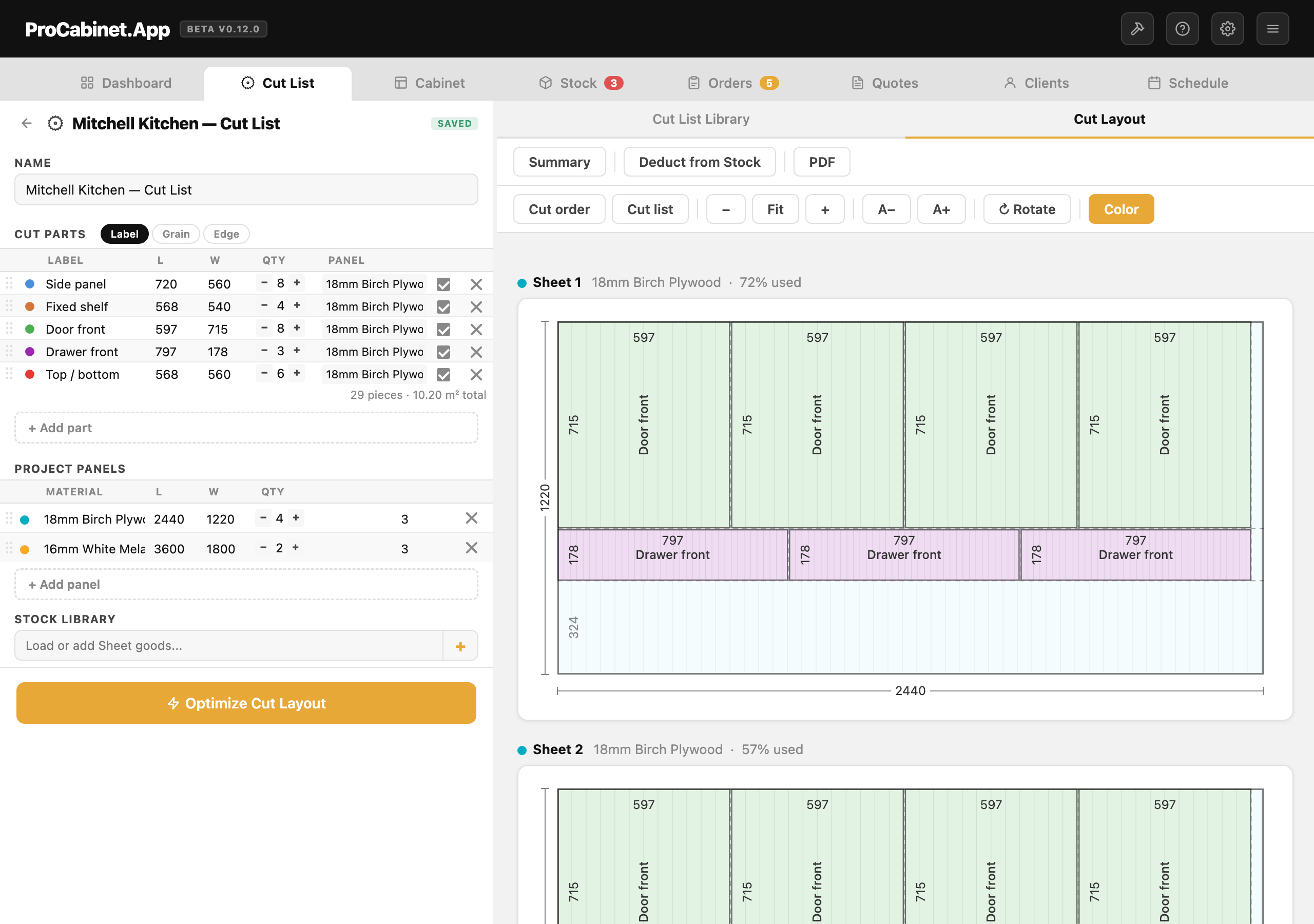
The honest answer depends on your shop. For a free desktop optimiser, MaxCut Community Edition is hard to beat. For a one-time purchase, CutList Plus fx. For CNC production at scale, Cabinet Vision. If you want the cut list connected to the quote the customer signed off, that is what I built ProCabinet.App to do.
I ran my own cabinetry workshop for over 10 years and have had hands on every tool below, some for years, some for an afternoon on the free tier. This is what I would tell another cabinet maker over a cup of tea, including the bit at the end where I declare which one is mine.
What should cut list software actually do?
Strip the marketing away and the job is short. You give it a list of panels, it fits them onto sheets, and it hands you something the workshop can cut from. Six things decide whether a tool is any good at that job.
| What to check | What good looks like |
|---|---|
| Nesting quality | High yield on a real mixed job, with offcuts big enough to keep |
| Grain direction | Lock doors and drawer fronts to the grain, let hidden parts rotate |
| Kerf allowance | Set your blade width once and forget it |
| DXF or CNC export | The layout leaves the software and reaches the machine |
| Price model | Know whether you are renting or buying |
| Platform | Web runs on anything; desktop in this field means Windows |
Yield is where the real money sits. A few percentage points saved across a year of sheet material pays for any tool on this list several times over, and I have put actual numbers on that in how to reduce plywood waste with nesting. Kerf matters more than people admit, because a 3mm blade across a row of rips does not sound like much until the last panel comes off 12mm short. Everything here handles grain and kerf, so the real differences are price, platform and what happens to the layout after it is drawn.
Is OptiCutter any good?
OptiCutter is a web app, nothing to install, and it does both linear cutting and sheet nesting. The free plan covers 5 stock sizes, 20 part sizes and 500 parts as of July 2026, enough to run a real kitchen through it. Paid plans are €9 or €19 a month, as of July 2026, and every plan, the free one included, exports to PDF, XLS, CSV and DXF. My only real gripe is that it is a general cutting tool rather than a cabinet tool, so every panel gets typed in by hand, every time.
Is CutList Plus fx worth the money?
CutList Plus fx is the old hand of the group: Windows desktop, one-time purchase, no subscription. As of July 2026 the Silver edition is $89 and caps you at 50 parts per project, Gold is $249 with unlimited parts, and DXF export only arrives in the $499 Platinum edition. It is thorough in an old-fashioned way, with material costing and purchasing lists built in, though it is Windows only and nobody would call it modern. If you want to pay once and cut from printed diagrams, it earns its keep. The $499 step for DXF is the sore point.
Is MaxCut really free?
MaxCut surprised me. The Community Edition is properly free, with no time limit, as of July 2026. It is a Windows desktop app built for cabinet work rather than generic cutting, so grain, kerf and sheet trims are handled without fuss, and it prints diagrams a saw operator can follow without coming back with questions. The Business Edition, $20 a month or $200 a year per device as of July 2026, adds client quotes, labour costs and panel labels. It exports DXF but not G-code. If your quoting lives elsewhere and you want the best free desktop optimiser, start here.
What is SmartCUT?
SmartCUT, sold as Smart2DCutting by Rasterweq, is Windows software with pricing from another era, and I mean that kindly. As of July 2026 a single licence is a one-time $85 for jobs up to 100 parts, or $295 for unlimited parts. The interface looks its age, but the nesting engine is quick, the yield is genuinely good, and it exports DXF. Edge banding and barcode part labels tell you it grew up in production shops rather than hobby sheds. If you want a cheap perpetual licence and do not care what the buttons look like, it deserves the trial download.
Is CutList Optimizer free to use?
CutList Optimizer is probably the one you have already used. It runs in the browser, there is an Android app, and the name is exactly what half of America types when searching for one. The free tier limits your calculations; as of July 2026 the Silver and Gold subscriptions remove the limit, and a cheap one-off opens everything for three days, fair for a single job. It handles grain direction and edge banding and exports the layout as a PDF, but I could find no DXF export as of July 2026, so for CNC work you redraw the layout in CAM.
Where does Cabinet Vision fit?
Cabinet Vision is not really a cut list optimiser, and it would be unfair to review it as one. It is full CAD/CAM for cabinet manufacturing, owned by Hexagon: you draw the job, it generates every part, nests them and drives the CNC directly through post-processors matched to your machine. There is no public price list as of July 2026; pricing is quoted per shop, and the sensible assumption is thousands rather than hundreds. For a production shop with a machine running all day, that money can come straight back in labour and material. For a one or two person shop, see the questions at the end.
What about ProCabinet.App, the one I built?
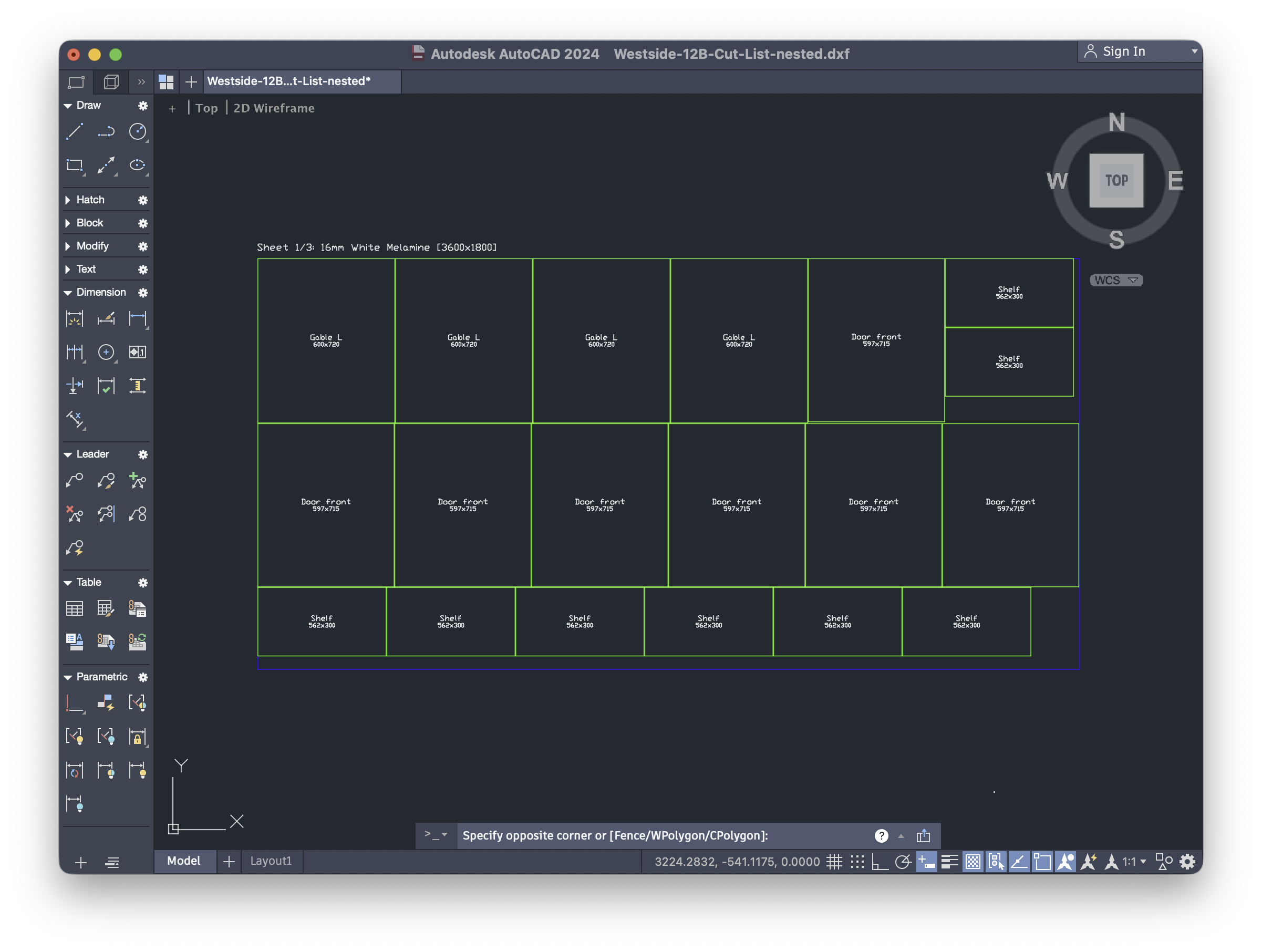
Declared interest, so weigh my words accordingly. What wore me down in over 10 years of running my own workshop was never the nesting; it was the cut list and the quote living in separate files, with me as the link between them. ProCabinet.App generates the cut list from the same cabinets the customer approved, so a size change at quote stage cannot silently miss the saw. It nests with grain direction and kerf allowance and exports standard DXF that opens in Vectric, Fusion 360, AlphaCAM or Cabinet Vision. The free plan is $0 forever with no card needed, with unlimited stock items and 5 saved items in each other library, and every account starts with a 14-day Pro trial. Pro is $25 a month at launch, rising to $35 after the first six months. The rest is on the features page.
How do the tools compare side by side?
| Tool | Platform | Pricing (as of July 2026) | DXF export | Best for |
|---|---|---|---|---|
| OptiCutter | Web | Free tier; €9 or €19 a month | Yes, on every plan | Occasional jobs from any device |
| CutList Plus fx | Windows | $89, $249 or $499 one-time | Platinum edition only | Buying once and owning it |
| MaxCut | Windows | Free Community; Business $20 a month or $200 a year | Yes, no G-code | Best free desktop optimiser |
| SmartCUT | Windows | $85 to $295 one-time | Yes | Cheap perpetual licence |
| CutList Optimizer | Web and Android | Free tier; Silver and Gold subscriptions | Not that I could find | Quick nesting in a browser |
| Cabinet Vision | Windows | Quoted per shop | Full CNC output | Production shops with staff |
| ProCabinet.App | Web | Free plan; Pro $25 a month at launch | Yes | Cut list connected to the quote |
Prices move, so treat the table as a snapshot and check before you buy.
Which cut list software should you pick?
You cut a few sheets a month. Use the free tiers of CutList Optimizer or OptiCutter and pay nothing. At that volume the difference between a 78% and an 82% yield is one offcut.
You run a panel saw most days and hate subscriptions. MaxCut Community Edition first, because free with no time limit is rare. If you outgrow it, SmartCUT or CutList Plus fx gets you a licence you own; just check where DXF sits in each price list before picking an edition.
Quoting eats your evenings and the cut list is retyped from the quote. The optimiser was never my bottleneck; pricing was, and retyping panel sizes between files was how mistakes reached the saw. My pricing method is in how to price cabinet jobs, and whether a shop your size needs software at all is answered straight in cabinet software or spreadsheets. Closing that gap between quote and cut list is what I built ProCabinet.App for.
You have staff, drawings to produce and a CNC running all day. Book a Cabinet Vision demo and compare it against what your machine's maker offers.
One last honest note. The jump from guessing to any optimiser is bigger than the jump between any two tools here. Pick the one that fits how you already work, not the one with the longest feature list.
Common questions
Is there a good free cut list optimiser?
Yes, several. MaxCut Community Edition is a genuinely free Windows desktop optimiser with no time limit as of July 2026, and it handles grain direction and kerf properly. In the browser, CutList Optimizer and OptiCutter both have free tiers that cover occasional work. ProCabinet.App's free plan includes the optimiser too, and every new account starts with a 14-day Pro trial with no card needed. Since I built that one, check the others first, but nobody should be paying just to find out whether optimised nesting helps their shop.
Does cut list software work with a CNC?
Usually through DXF. The optimiser exports the nested layout as a DXF file, your CAM software such as Vectric or Fusion 360 opens it, and you add toolpaths there. As of July 2026, MaxCut, SmartCUT and OptiCutter export DXF, CutList Plus fx does only in its $499 Platinum edition, and ProCabinet.App exports the nested layout as standard DXF. CutList Optimizer had no DXF export that I could find. Cabinet Vision drives the machine directly through post-processors, which is a large part of what its price buys.
Is Cabinet Vision overkill for a small shop?
For a one to three person shop, usually yes. Pricing is quoted per shop rather than published, as of July 2026, the package is modular, and the training time is real. If you mainly need panels nested and a clean cut list, you would be paying for drawing, engineering and machine control you may never use. The exception is a small shop that already runs a CNC flat out and sells work off proper drawings; at that point Cabinet Vision stops being overkill and becomes the production system.
Try ProCabinet free. Every account starts with 14 days of Pro — no card needed. Set your rates once, then quote, cut, schedule and bill from one place.
Start free